Sharing Decks on the Deck Exchange
The Share Decks Tool is launched by clicking the Share Decks Button in the Deck Exchange.
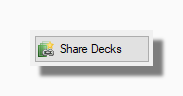
The main grid shows details of the decks you are currently sharing.
The Shared By column reminds you of the name you used to share the deck as decks can be shared anonymously or under a pseudonym.
The Times Downloaded column tells you the number of times each deck has been downloaded on the exchange.
Additional columns give details of the date you shared or last updated the deck on the Exchange, the number of cards it contains and the size of the compressed zip file.
Sharing or Updating a Deck
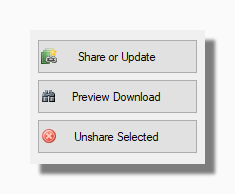
The Share or Update button is used to either share a new deck or update a deck you already shared. In either case the process is the same: you browse for the deck in your collection, set appropriate values on the Share or Update window and upload the deck anew. In short, if you want to update a deck on the Deck Exchange, the procedure is to overwrite it.
Tip: Bear in mind that you cannot share two decks with the same name. This is because on the server all the shared decks are uniquely identified by the combination of the deck's name and who shared it. You may have two or more decks with the same name in different folders in your collection, perhaps alternative versions of the same deck. If you want to share them on the Exchange you should give them names that uniquely identify them and describe what makes them different. This will prevent you accidentally overwriting any deck your previously shared.
The Preview Download button shows you the Preview Download window for your shared deck, exactly as another user would see it if they wanted to download your shared deck on the Deck Exchange.
The Unshare Selected button lets you unshare the deck you have currently selected in the grid. When you unshare a deck it is permanently deleted on the server.